
How do I setup a default email account?

Text Version

In this tutorial we will setup the default email address for our site. The default address is where all email sent to non-existant addresses is forwarded to.
Begin by clicking the Default Addresses button.
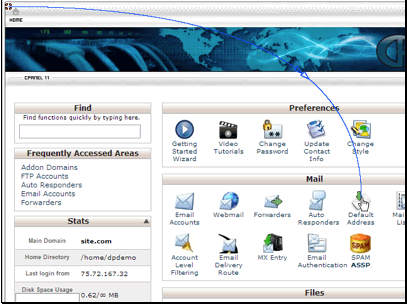
In this tutorial we will setup the default email address for our site. The default address is where all email sent to non-existant addresses is forwarded to.
Begin by clicking the Default Addresses button.

By default the email is discarded with a failure so the sender knows the address doesn't exist. We want to change it to send the email to an address we specify.
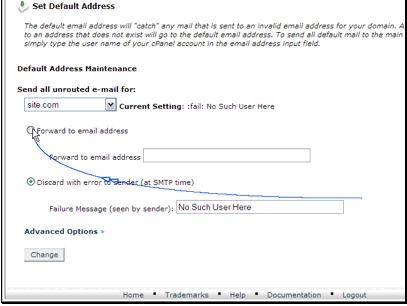
By default the email is discarded with a failure so the sender knows the address doesn't exist. We want to change it to send the email to an address we specify.

Then enter the email address to deliver the email to.
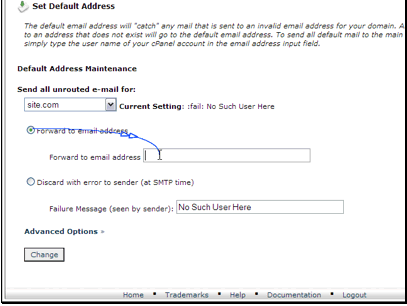
Then enter the email address to deliver the email to.

There are also a couple other options.
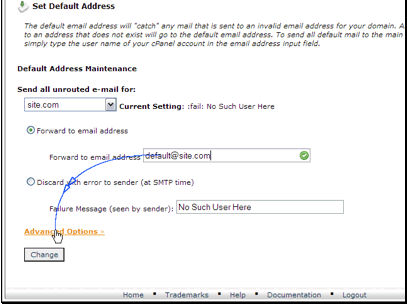
There are also a couple other options.

We can discard the email without sending a failure notice. This is not recommended since the sender won't know the email wasn't delivered.
We can also pipe the email to a program installed on our site.
When you're done click Change.

We can discard the email without sending a failure notice. This is not recommended since the sender won't know the email wasn't delivered.

We can also pipe the email to a program installed on our site.
When you're done click Change.

Our default email has been setup.
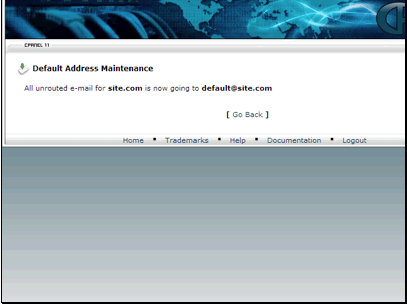
Our default email has been setup.

Buyhttp offer 30 days money back guarantee

  • 2 Users Found This Useful
Was this answer helpful?

Related Articles

I can't create a database in phpMyAdmin

Databases need to be created in cPanel. You can then edit your database from phpMyAdmin. For a...

Unable to create a DB in cPanel

If cPanel/MySQL not working correctly but mysql is working on the server run the following...

How do I create a MySQL database?

Text Version In this tutorial we will be setting up a new MySQL database. Begin by clicking...

phpMyAdmin access Denied

To fix an "Access Denied" error when trying to launch phpMyAdmin, reset your cpanel password...