
How do I manage services?

Text Version

In this tutorial we will be managing the services on our VPS.
Begin by clicking the System Services link.
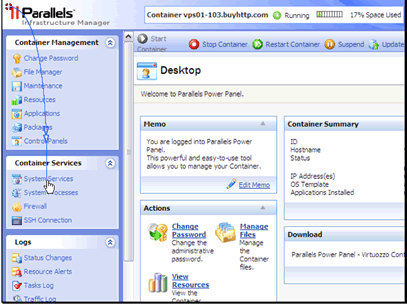
In this tutorial we will be managing the services on our VPS.
Begin by clicking the System Services link.

If a service isn't running but you want it to be, select the service and click Start Service.
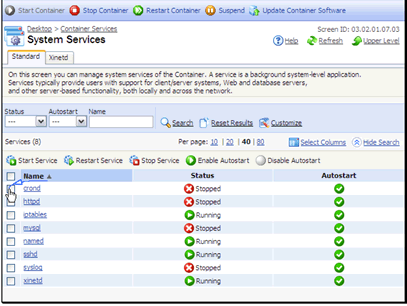
If a service isn't running but you want it to be, select the service and click Start Service.

Our service has been started.
Sometimes a service might be running but is causing some troubles or not operating correctly. In that case we can restart the service by selecting it and clicking the Restart Service button.
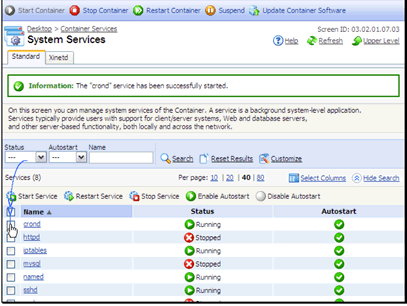
Our service has been started.
Sometimes a service might be running but is causing some troubles or not operating correctly. In that case we can restart the service by selecting it and clicking the Restart Service button.

Confirm you want to restart the service.
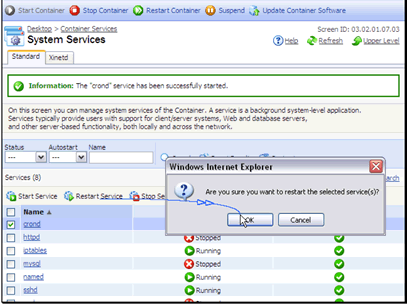
Confirm you want to restart the service.

Our service has been restarted.
You can also stop any services you don't want to have running.
And you can enable or disable autostart. Autostart attempts to detect if a service is running or not and start it if it's not running.

Our service has been restarted.
You can also stop any services you don't want to have running.
And you can enable or disable autostart. Autostart attempts to detect if a service is running or not and start it if it's not running.

  • 1 Users Found This Useful
Was this answer helpful?

Related Articles

Invalid License File

If cPanel is reporting "Invalid License File" on VPS or dedicated server, run the following...

How do I manage processes?

Text Version In this tutorial we will be managing our system processes.Begin by clicking the...

How do I setup packages?

Text Version In this tutorial we will be managing the packages installed on our VPS. This...

Will I have access to a firewall for my VPS?

Yes. You will have full access to the server including firewalls.

How do I manage the firewall?

Text Version In this tutorial we will be managing the firewall on our VPS.Begin by clicking...