
How do I monitor my server?

Text Version

In this tutorial we will be monitoring certain things on our server.
First, click on Server Information

In this tutorial we will be monitoring certain things on our server.
First, click on Server Information

This screen will tell you abour the hardware on your server.

This screen will tell you abour the hardware on your server.

Now click on Service Status.
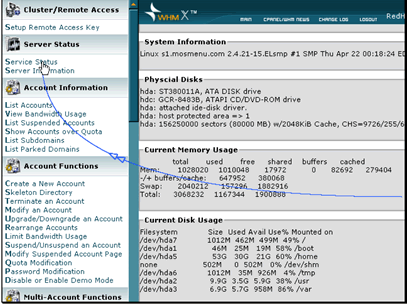
Now click on Service Status.

This screen will tell you about the different programs running on your server.

This screen will tell you about the different programs running on your server.


BuyHTTP offer fully managed dedicated server

  • 2 Users Found This Useful
Was this answer helpful?

Related Articles

How do I manage suspended accounts?

Text Version From time to time you will need to suspend accounts on your server for various...

How do I manage a skeleton directory?

Text Version In this tutorial we will be looking at the skeleton directory. The skeleton...

How do I manage passwords?

Text Version In this tutorial we will be modifying the password for one of our accounts.Click...

How do I manage accounts?

Text Version In this tutorial we will be adding a new account.Click Create a New Account under...

How do I reset my cPanel or WHM reseller password?

To reset your cPanel or WHM reseller password Login to your account manager >go to My...